
Once mUlt1ACE is installed, open it in your web browser at
<printer-ip>/multiace.

By default the Dashboard is active, and you can also choose a different language here. To open the configuration, click Config.
Command & safety options
Confirm commands
Ask before load/unload in the web UI
A confirmation dialog before any action that moves filament (load, unload, load all, unload all). Web UI only, gcode, display and print are never gated. Applies immediately (no Save needed) and is stored on the printer, so it holds on every device.
Air-Print Detection
Pause the print when a lane stops flowing (chew/clog protection)
Watches every load's coil measurement against the lane's own baseline (per lane and per head) and monitors back-pressure live while printing (airlog chew detector). Two suspicious readings pause the print resumably, before air is printed. Warnings are always logged; this switch only arms the pauses. Persisted.
Quad Replenish
Auto-reload from a backup slot on runout
When a spool runs out and no twin head can take over, the head is reloaded from a slot with the same declared identity (type and color) and the print resumes automatically. Head mode: the other slots of the head's ACE; multi: the same slot on another ACE.
Switch heads first (before draining the lane)
Off (default): the printing head works through its own ACE slots first, then the next head takes over. Reaches every spool and keeps the sliced head layout, but each spool change costs a reload (~90s). On: stock switches to another loaded head first. Instant, but it rewrites the tool mapping for the rest of the print, leaves the slots of heads that already emptied unused, and cannot act at all across different nozzle sizes.
Pickup-Cleaning (BG Swaps)
Wipe the nozzle after tool pickups that have no cleaning move
After a same-color tool pickup with no swap/flush, a short nozzle wipe at the discard position removes the parked head's ooze thread (real swaps and background arrivals already wipe). Costs a discard excursion per pickup; applies to the next preflighted print.
Fluidd panel
Add as a camera in Fluidd
Registers the compact panel as an "HTTP Page" camera, so it appears on the Fluidd dashboard. An entry of the same name is left alone, so your own adjustments survive a second click.
Settings
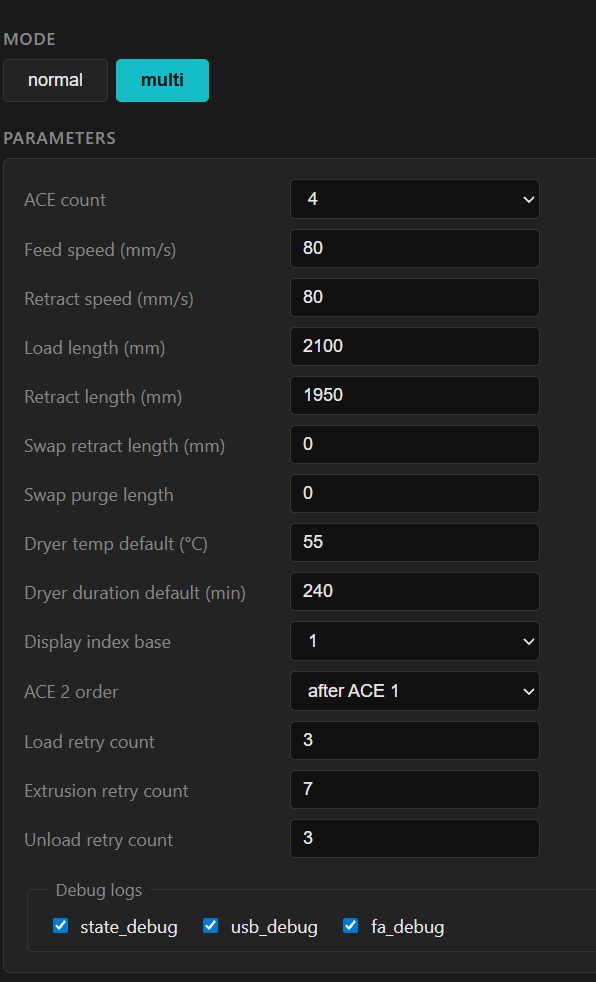
Head mode
Connect one ACE 1/2 per head.
Multi mode
Connect ACE slots combined per head.
Normal mode
Switches back to stock Snapmaker operation and activates the original feeders.
ACE count
Sets the number of connected ACE units (ACE 1 and ACE 2 combined).
ACE 2 order
Order of the ACE 2 units, before or after the ACE 1 units.
Display index base
Numbering of toolheads, ACEs and slots: 0-3 or 1-4.
Feed speed (mm/s)
Speed for the load movement. This also affects the color swap. I recommend leaving it at default (80).
Retract speed (mm/s)
Speed for the unload movement (default 80). ACE 1 filament tends to tangle on retract, which is better countered with a printed guide than by changing the speed.
Load length (mm)
The Bowden length used when loading. The load is stopped by the toolhead sensor, so the length is not strictly required; it mainly limits how far transport is attempted if something goes wrong. Set it a touch longer than the actual ACE-to-toolhead Bowden length, so the filament reaches the toolhead on the first load attempt.
Retract length (mm)
ACE 1 has no sensor at the filament outlet, so set the length so the filament is pulled back as far as possible without unloading the ACE slot.
Load retry count
If the filament does not reach the sensor while loading, it retracts briefly and tries to feed again.
Extrusion retry count
The filament loading phase after Load. If no movement is detected during extrusion, the filament is retracted and fed again, alternating between the extruder and the ACE. This is the total number of attempts.
Unload retry count
If filament is still detected in the sensor after unloading (a short forward move), the unload is started again.
Seat press length (mm, 0 = off)
A short seating push at the end of a load, to make sure the filament is fully seated in the toolhead. 0 disables it.
Swap retract length (mm)
During color swaps the retract length can be shortened to save time. Set it so the filament is pulled just behind the splitter, with a little safety margin, to keep a splitter free in case of transport problems. 0 = use the Retract length.
Swap purge length
Amount of filament purged during a color swap. 0 = default.
Per-pair purge
Size each purge per pair from the flush matrix
On: the preflight sizes each swap's purge per pair from the slicer's flush matrix. Off: it stamps and purges the fixed Swap purge length again, also on files that already carry purge amounts.
Dryer temp default (°C)
Default temperature for the ACE units' drying function.
Dryer duration default (min)
Default duration for the ACE units' drying function.
Spoolman URL
URL of your Spoolman instance for filament tracking, for example http://host:7912.
Spoolman sync
Sync spools with Spoolman
When Spoolman is selected as the spool mode, it is the source of truth: a pull takes over material and color (Spoolman applies its own density). Only spools carrying a Spoolman ID are synced.
Spool mode
Local: local spool management on the printer. Spoolman: syncs to Spoolman. Spoollink: syncs to Spoollink.
Debug logs
Enable this after consulting the developer, so detailed error logs can be sent.
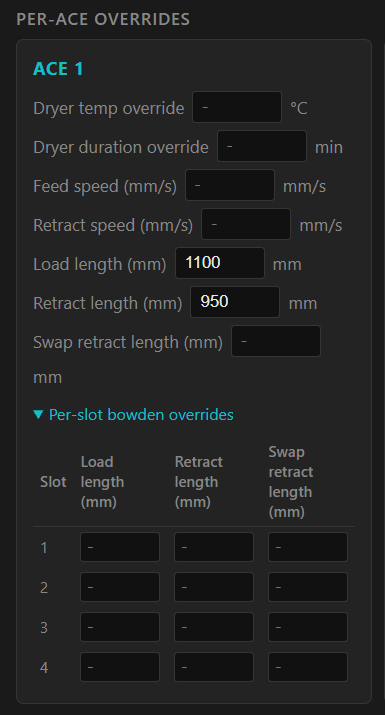
Per-ACE and per-slot overrides
Here you can override some of the values above per ACE or per slot. If a field is left empty, the parent value always applies.
Temp and tip forming
mUlt1ACE makes the U1's tip forming configurable per material. See the dedicated section for the parameters and how to tune them.
ACE 2 firmware
mUlt1ACE ships no firmware and links to none. You need the Anycubic update package for the selected target version and its password. Alternatively, perform the update through an Anycubic printer. Flash at your own risk.
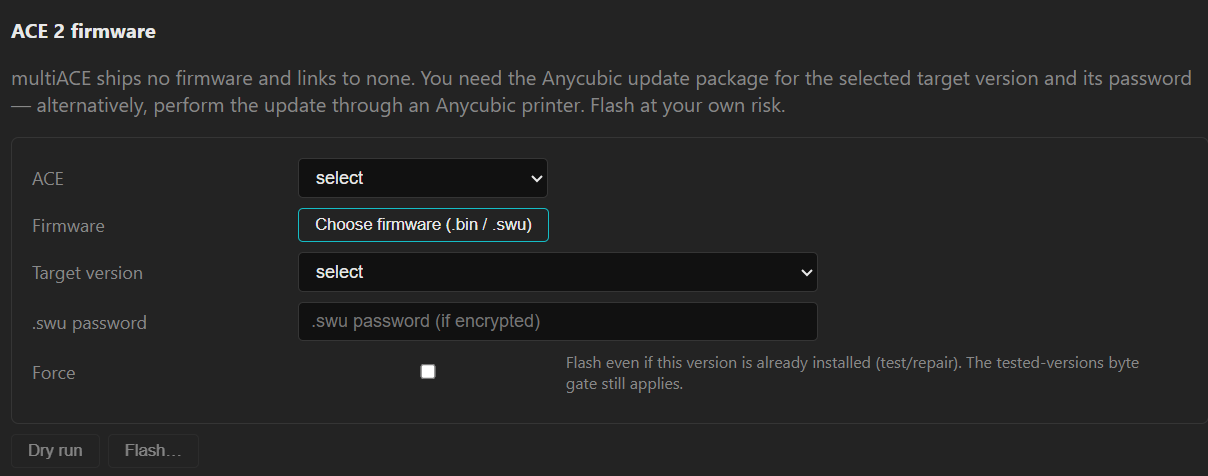
- ACE: the ACE unit to flash.
- Firmware: the firmware file (.bin / .swu).
- Target version: the version you are flashing to.
- .swu password: the package password, if it is encrypted.
- Force: flash even if this version is already installed (test/repair). The tested-versions byte gate still applies.
- Dry run / Flash: Dry run validates without writing, Flash performs the update.